

Artificial intelligence is no longer limited to large technology companies. Today, small businesses, freelancers, content creators, and entrepreneurs can use AI to automate tasks that once required entire teams.
One of the most popular applications of AI is chatbots. Modern AI chatbots can answer customer questions, provide support, generate leads, schedule appointments, and even help users make purchasing decisions.
The best part is that you no longer need programming skills to build one.
Thanks to modern no-code platforms, anyone can create an AI chatbot in just a few hours. Whether you run an online store, a service business, or a personal website, an AI chatbot can improve customer experience while reducing workload.
In this guide, you’ll learn exactly how to build your first AI chatbot without writing a single line of code.
What Is a No-Code AI Chatbot?
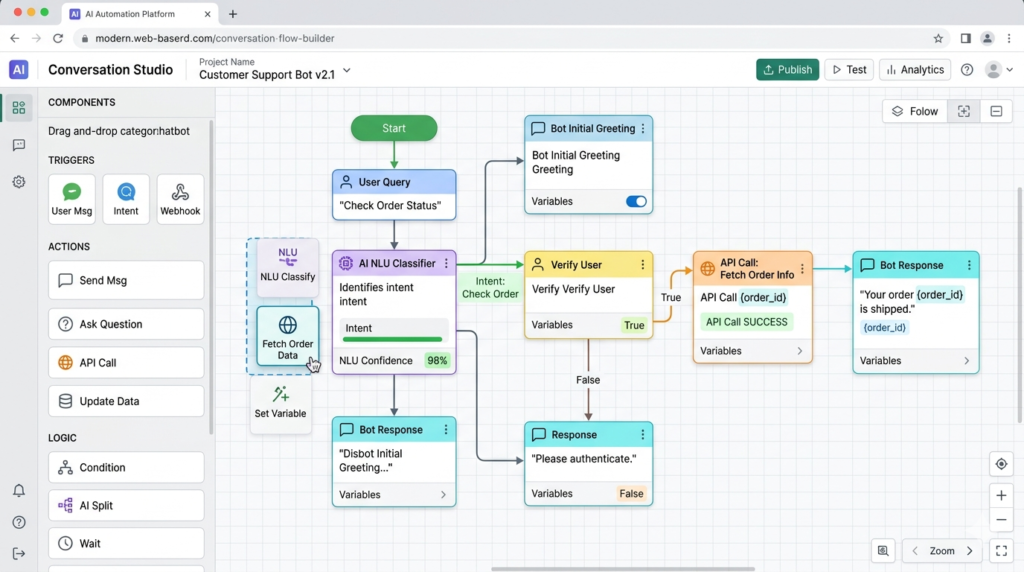
A no-code AI chatbot is a chatbot that can be created using visual tools instead of programming languages.
Rather than writing complex code, users simply drag and drop components, configure responses, and connect AI models.
As a result, building chatbots has become accessible to everyone.
Modern chatbot platforms allow users to:
- Answer customer questions
- Collect contact information
- Provide product recommendations
- Schedule meetings
- Automate customer support
- Generate leads
Therefore, businesses of all sizes can benefit from chatbot technology.
Why Businesses Are Using AI Chatbots
Customer expectations have changed dramatically.
People want answers immediately.
However, hiring support staff to provide 24/7 assistance is expensive.
This is where AI chatbots become valuable.
They can:
- Respond instantly
- Handle multiple conversations simultaneously
- Reduce support costs
- Improve customer satisfaction
- Increase conversion rates
Moreover, AI chatbots never get tired and can work around the clock.
Because of this, businesses increasingly rely on chatbot technology to improve efficiency.
Step 1: Define the Purpose of Your Chatbot
Before building anything, determine exactly what you want your chatbot to accomplish.
For example:
Customer Support Chatbot
Answers common questions and provides assistance.
Lead Generation Chatbot
Collects visitor information and captures potential customers.
E-commerce Chatbot
Recommends products and helps customers complete purchases.
Appointment Booking Chatbot
Schedules meetings automatically.
The clearer your goal, the easier the setup process becomes.
Step 2: Choose a No-Code Chatbot Platform
Several platforms make chatbot creation simple.
Popular options include:
- Voiceflow
- Botpress
- Landbot
- Tidio
- ManyChat
- Chatbase
Each platform offers different features and pricing plans.
For beginners, choose a platform with:
- Drag-and-drop builder
- AI integration
- Easy deployment
- Good documentation
- Affordable pricing
Furthermore, many platforms offer free plans for testing purposes.
Step 3: Create Your Chatbot Flow
The chatbot flow determines how conversations progress.
Think of it as a roadmap for user interactions.
A basic chatbot flow may include:
- Welcome message
- User question
- AI response
- Follow-up options
- Contact information collection
For example:
User: “What are your business hours?”
Chatbot: “We’re open Monday through Friday from 9 AM to 6 PM.”
Simple conversation paths often produce the best results.
Therefore, avoid making your first chatbot overly complicated.
Step 4: Add AI Capabilities
Traditional chatbots rely on predefined responses.
Modern AI chatbots are much more powerful.
By connecting AI models, your chatbot can:
- Understand natural language
- Generate dynamic responses
- Answer unexpected questions
- Learn from context
As a result, conversations feel more natural and human-like.
This significantly improves user experience.
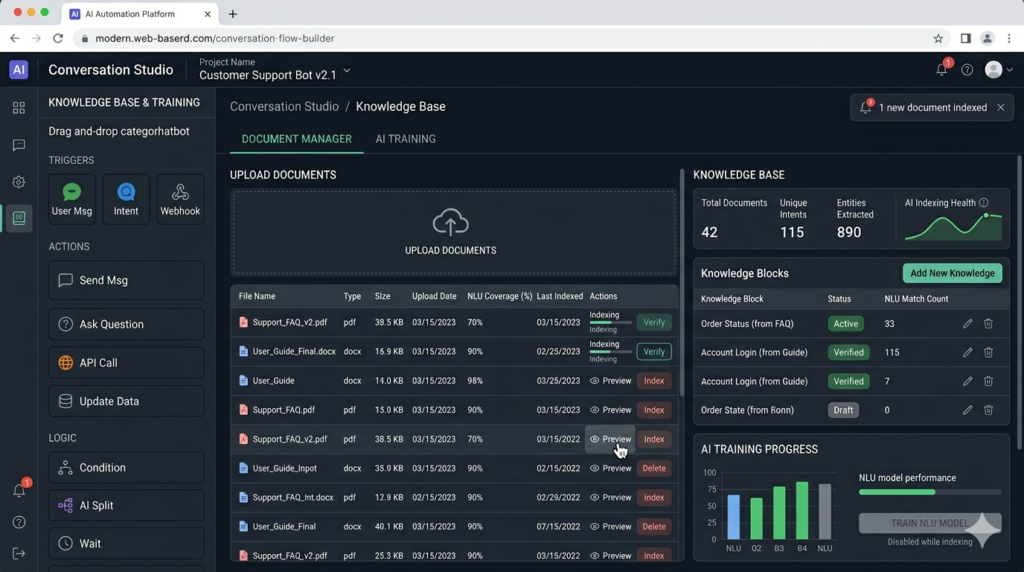
Step 5: Train Your Chatbot
Training helps your chatbot provide accurate information.
Most no-code platforms allow you to upload:
- FAQs
- Product information
- Documentation
- Knowledge bases
- Website content
The AI then uses this information when responding to users.
Consequently, your chatbot becomes more relevant and useful.
Step 6: Test Before Launching
Testing is one of the most important steps.
Many beginners skip testing and launch immediately.
Unfortunately, this often leads to poor user experiences.
Before deployment, test:
- Common questions
- Complex questions
- Navigation flows
- Contact forms
- Error handling
Additionally, ask friends or colleagues to interact with the chatbot.
Fresh perspectives often reveal issues you might overlook.
Step 7: Deploy Your Chatbot
Once testing is complete, it’s time to launch.
Most chatbot platforms provide simple installation methods.
You can typically deploy chatbots on:
- Websites
- Landing pages
- Online stores
- Facebook Messenger
- Mobile apps
As a result, users can access support wherever they prefer to communicate.
Best Practices for AI Chatbots
Creating a chatbot is easy.
Creating an effective chatbot requires strategy.
Follow these best practices:
Keep Responses Short
Users prefer quick answers.
Use Natural Language
Conversations should feel human.
Provide Clear Navigation
Help users find information quickly.
Offer Human Support Options
Not every issue can be solved by AI.
Update Knowledge Regularly
Keep chatbot information accurate and current.
Common Mistakes Beginners Make
Many first-time chatbot creators make similar mistakes.
These include:
- Overcomplicating conversation flows
- Ignoring user experience
- Providing inaccurate information
- Skipping testing
- Failing to update content
Fortunately, these mistakes are easy to avoid with proper planning.
How AI Chatbots Increase Business Growth
AI chatbots are more than customer support tools.
They can directly contribute to growth.
For example:
- Generate leads automatically
- Increase customer engagement
- Reduce support costs
- Improve conversion rates
- Collect valuable customer insights
Consequently, businesses can improve efficiency while delivering better experiences.
The Future of AI Chatbots
Chatbots are evolving rapidly.
Future AI chatbots will become:
- More personalized
- More accurate
- More conversational
- Better integrated with business systems
Additionally, voice-based interactions will continue growing.
As AI technology advances, chatbots will become increasingly important for businesses of every size.
Final Thoughts

Building an AI chatbot without code has never been easier.
Modern platforms eliminate the technical barriers that once prevented businesses from adopting chatbot technology.
By defining a clear purpose, choosing the right platform, training your chatbot properly, and testing thoroughly, you can create a powerful AI assistant that improves customer experience and supports business growth.
The best approach is to start simple.
Launch a basic chatbot, gather feedback, and improve it over time.
Small improvements often lead to significant long-term results.
FAQ
Can I build an AI chatbot without coding?
Yes. Modern no-code platforms allow anyone to create AI chatbots using visual builders.
What is the best no-code chatbot platform?
Popular options include Voiceflow, Chatbase, Botpress, and ManyChat.
Are AI chatbots free?
Many platforms offer free plans, although advanced features usually require paid subscriptions.
Can chatbots replace human support?
Chatbots can handle routine questions, but human support remains important for complex situations.
How long does it take to build a chatbot?
A basic chatbot can often be built within a few hours.