
In 2026, doomscrolling remains one of the biggest silent productivity killers. Endless feeds powered by AI algorithms deliver variable rewards that hijack your dopamine system, much like a slot machine. The average person spends over 2.5 hours daily on social media alone, with many losing 3–4 hours to negative news, endless reels, and mindless comparisons. This habit fuels anxiety, disrupts sleep, shortens attention spans, and steals time from deep work, relationships, and real-life growth. Best Apps
The good news? You don’t need superhuman willpower. Dedicated apps now combine hard blocking, gentle friction, gamification, and habit replacement to break the cycle. These tools don’t just limit screen time—they help you reclaim hours every week for what truly matters.
Whether you’re an overwhelmed professional, a student battling TikTok rabbit holes, or a developer building the next wave of mobile apps, the right tools can transform your relationship with your phone. At apkmirror.shop, we explore how mobile technology shapes daily life, and these apps represent some of the smartest solutions available today.
1. Freedom – The Ultimate Cross-Device Hard Blocker
Freedom stands out as the most powerful nuclear option for serious doomscrollers. It blocks distracting apps and websites (Instagram, TikTok, YouTube, news sites, games) across your phone, tablet, laptop, and desktop simultaneously. You create custom blocklists or use presets, schedule recurring sessions, and enable Locked Mode so you literally cannot quit mid-session.
Key 2026 features: Ambient focus sounds (café, nature, Brain.fm integration), Pomodoro timers, and website exceptions. Users report gaining +2.5 hours of focused time daily, 20% higher productivity, and better sleep by blocking late-night scrolling.
Platforms: Android, iOS, Mac, Windows, Linux, Chromebook.
Pricing: Free to try (one session); premium subscription for full features.
Best for: People who need unbreakable boundaries across devices.
Download: freedom.to
2. Opal – Deep Focus with Powerful Analytics
Opal combines strict blocking with data-driven insights, making it one of the most intelligent screen-time apps in 2026. Its Focus Blocks and App Limits automatically lock social media during work hours, while Deep Focus mode temporarily bricks your phone to only essential apps—nearly impossible to bypass.
Real-time Focus Score, weekly reports, leaderboards for friendly competition, and peer benchmarks keep you accountable. Users save an average of 1 hour 23 minutes daily—that’s over a month per year and potentially 6 years of life reclaimed across its user base.
Platforms: Strongest on iOS and Mac; solid Android version.
Pricing: Free trial; Pro unlocks full power.
Best for: Data lovers who want measurable progress and gamified accountability.
Download: opal.so
3. Forest – Gamified Focus That Grows on You (Literally)
Forest turns staying off your phone into a delightful game. Plant a virtual tree when you start a focus session. Stay away from distracting apps and it grows into a beautiful forest. Leave to scroll and the tree dies. Over time, your virtual forest becomes a visual reminder of reclaimed time.
The app partners with real reforestation projects—so premium users actually plant trees in the real world. It’s perfect for short Pomodoro-style sessions and feels less like punishment, more like play.
Platforms: Excellent native apps for Android and iOS.
Pricing: One-time purchase for core features + optional premium for real-tree planting.
Best for: Visual learners and anyone who responds to positive reinforcement over strict blocking.
Download: forestapp.cc
4. One Sec – The Scientific Pause That Breaks Muscle Memory
Instead of full blocking, One Sec adds a mandatory 4-7-8 breathing exercise (or other friction like phone rotation or journaling) before opening addictive apps. This tiny interruption gives your brain a moment to choose consciously instead of autopilot-scrolling.
Backed by university research (Max-Planck Institute and others), users cut social media use by 57% on average and reclaim 2 hours per day. It also includes website blocking, emergency brakes for doomscroll spirals, and browser extensions.
Platforms: iOS, Android, Mac, and all major browsers.
Pricing: Free essentials; premium for advanced interruptions and unlimited blocks.
Best for: People who hate strict blockers but need help with unconscious habits.
Download: one-sec.app
5. AppBlock – Android’s Strictest Doomscrolling Killer
AppBlock is a favorite for Android users seeking no-nonsense control. Block individual apps or entire websites with timers, recurring schedules, or Strict Mode (which prevents uninstalling the blocker itself). It also tracks detailed usage stats so you see exactly where your time disappears.
Many users report saving 2.74 hours per day in the first week alone. Quick Mode lets you block distractions instantly when the urge hits.
Platforms: Native Android and iOS apps + Chrome extension.
Pricing: Free with ads; premium removes limits and adds advanced features.
Best for: Android-first users who want hardcore blocking without complexity.
Download: appblock.app or Google Play.
6. Headway – Replace Doomscrolling with Bite-Sized Growth
Blockers create a vacuum—Headway fills it productively. It condenses bestselling nonfiction books into 15-minute text and audio summaries with streaks, challenges, and personalized plans. Instead of mindless reels, you get dopamine from actual knowledge and growth.
Platforms: iOS and Android.
Pricing: Subscription model with free trial summaries.
Best for: Lifelong learners who want to swap scrolling for self-improvement.
Download: makeheadway.com
7. ScreenZen & Built-in Tools (Google Digital Wellbeing / Apple Screen Time)
ScreenZen adds gentle delays and reminders before opening apps—free and effective for gradual change. Pair it with your phone’s native tools: Google’s Digital Wellbeing (Android) or Apple’s Screen Time (iOS) for free app limits, grayscale mode, and bedtime wind-downs.
These built-ins are surprisingly powerful when combined with a third-party app.
How to Choose and Combine Apps in 2026
Start simple: Use One Sec or ScreenZen for a week to build awareness, then layer Freedom or AppBlock for heavy sessions. Replace freed time with Headway or Forest to avoid rebound scrolling. Track progress weekly—most users see 40–60% reductions within the first month.
Pro tips:
- Schedule blocks during peak doomscroll hours (evenings, mornings).
- Enable grayscale mode in accessibility settings.
- Combine with physical habits: phone in another room during meals.
- For developers reading this: Building features like breathing pauses or deep-focus modes is a booming niche. Learn how to create engaging mobile experiences in our Custom Mobile Application Development: A Complete Guide for Businesses.
If you run a company or need enterprise-level solutions, check Top Benefits of Enterprise Mobile Application Development for Modern Companies or explore Best Mobile Application Development Companies in Chicago in 2026.
Reclaim Your Time Starting Today
Doomscrolling steals more than minutes—it steals your potential. The apps above have collectively helped millions reclaim years of life through better focus, sleep, and mental health. Pick one (Freedom or One Sec are great starters), commit for 14 days, and watch your days expand.
Your future self—more productive, less anxious, and fully present—will thank you.
Ready to build better digital habits? Explore more productivity and tech guides at this website and take back control in 2026.
Best Apps to Stop Doomscrolling and Reclaim Your Time in 2026 (Updated with FAQs and Top Products)
Doomscrolling continues to dominate daily habits in 2026, with users losing hours to endless negative feeds, short videos, and algorithm-driven content. As awareness grows, so do the tools designed to interrupt the cycle—ranging from strict blockers to gentle habit replacers. Building on the core recommendations, here are frequently asked questions (FAQs) users commonly search for, plus a roundup of the top products (apps and related tools) making the biggest impact this year.
Frequently Asked Questions (FAQs) About Stopping Doomscrolling
1. What actually works to stop doomscrolling in 2026?
No single method fits everyone, but combining friction (like mandatory pauses or blocks) with replacement habits yields the best results. Strict blockers like Freedom or Opal create hard barriers, while gentler tools like One Sec interrupt autopilot behavior. Many users report 50–60% reductions in social media time within weeks by layering apps with phone settings (e.g., grayscale mode or scheduled downtime). Physical solutions, such as placing your phone in another room or using devices like Blok or Brick, add real-world friction that digital tools alone can’t match.
2. Are built-in phone features enough, or do I need third-party apps?
Built-in tools—Apple Screen Time (iOS) and Google Digital Wellbeing (Android)—are free and powerful for basic limits, wind-down modes, and app timers. However, they’re easy to bypass. For unbreakable accountability, third-party apps like AppBlock (with Strict Mode) or Opal (Deep Focus) outperform natives, especially for cross-device blocking.
3. What’s the best free way to start stopping doomscrolling?
Begin with One Sec (free core features add breathing pauses before opening apps) or ScreenZen (gentle delays and reminders). Pair them with your phone’s grayscale mode (via accessibility settings) to make colorful feeds less appealing. For replacement, try free summaries in Headway or plant virtual trees in Forest‘s basic mode.
4. Do these apps really help with mental health, or is it just about time management?
They address both. Reducing doomscrolling lowers anxiety from constant negative news, improves sleep (by blocking late-night sessions), and boosts focus. Apps like Calm or Headspace (often recommended alongside blockers) add mindfulness to calm post-scroll stress, while knowledge apps like Headway provide positive dopamine from growth instead of outrage.
5. How do I replace the scrolling habit without feeling bored?
Fill the void with productive micro-habits: short book summaries (Headway or Blinkist), language lessons (Duolingo), brain games (Elevate or Vocabulary), podcasts (Pocket Casts), or puzzles (NYT Games). Gamified focus apps like Forest make restraint rewarding, turning “no scrolling” into visible progress.
6. Are there any new or emerging apps in 2026 worth trying?
Yes—Blok (physical phone locker for ultimate friction), Unrot (forces productive tasks before unlocking feeds), and minimalist launchers like Dumb Phone or LessPhone simplify your home screen. For analytics lovers, Opal leads with detailed Focus Scores and benchmarks.
7. Can I stop doomscrolling without deleting social media apps entirely?
Absolutely. Tools like Freedom or Stay Focused let you schedule blocks (e.g., evenings only) or add delays. One Sec forces a conscious choice without full removal. Many users keep apps for intentional use (checking messages or posting) but restrict mindless browsing.
8. How long does it take to break the doomscrolling habit?
Most see noticeable changes in 1–2 weeks with consistent use of blockers and replacements. Full habit rewiring often takes 30–60 days, especially when tracking progress via app reports or journals.
Top Products for Stopping Doomscrolling in 2026
Beyond the main apps (Freedom, Opal, Forest, One Sec, AppBlock, Headway), here are standout performers based on user results and reviews:
- Blok → Best physical blocker. A small device that locks your phone in “airplane mode” or restricted access during focus periods. Ideal if digital willpower fails. Platforms: iOS/Android companion app.
Learn more: blok.so - Brick → Similar physical card/device that triggers app blocks when separated from your phone. Popular for its minimal design and real friction.
Often paired with ScreenZen for hybrid digital-physical control. - Blinkist → Top book-summary alternative to Headway. 15-minute nonfiction insights with audio/text. Great for swapping reels for knowledge.
Download: blinkist.com - Stay Focused → Simple Android/iOS timer for per-app limits. Lightweight and effective for beginners.
Strong for quick daily caps on TikTok/Instagram. - Calm / Headspace → Mindfulness apps to manage post-scroll anxiety. Guided sessions reduce the emotional pull of negative content.
- Duolingo / Elevate → Habit-replacement kings. Gamified learning keeps you engaged without endless feeds.
- Minimalist Launchers (Dumb Phone, LessPhone) → Turn your smartphone into a “dumb phone” by hiding icons and simplifying the interface. Reduces temptation at the source.
For developers or businesses interested in this space, custom features like AI-driven pause prompts or enterprise blocking are hot trends. Check our guides on Custom Mobile Application Development or Enterprise Mobile Solutions.
Doomscrolling is beatable in 2026 with the right mix of tools, awareness, and small replacements. Start with one FAQ-inspired tip today—maybe add a pause before opening apps or plant a tree in Forest—and build from there. Reclaim those hours for real life.
Explore more tech and productivity insights at our website .
Best Apps to Stop Doomscrolling and Reclaim Your Time in 2026 (Expanded with More Top Products)
Doomscrolling persists as a major time thief in 2026, but the ecosystem of tools has matured with innovative blockers, habit replacers, physical devices, and AI-assisted interventions. Building on the previous recommendations (Freedom, Opal, Forest, One Sec, AppBlock, Headway, ScreenZen, and built-in tools), here are additional standout top products that users and experts frequently praise for breaking the cycle. These include stricter physical solutions, gamified alternatives, learning-focused swaps, and emerging niche apps.
These picks draw from real user feedback, productivity communities, and recent reviews—many help replace the dopamine hit of scrolling with healthier rewards like learning, mindfulness, or real-world friction.
More Top Products to Stop Doomscrolling in 2026
- RepsForReels → Best exercise-based blocker. This app locks distracting apps (social media, news) until you complete physical reps like push-ups, squats, or steps tracked via your phone. It turns “just one more scroll” into movement, combining fitness with focus. Users love the guilt-free dopamine from workouts over endless feeds.
Platforms: iOS and Android.
Pricing: Free tier + premium (~$4.99/month).
Best for: Active people who want productive punishment.
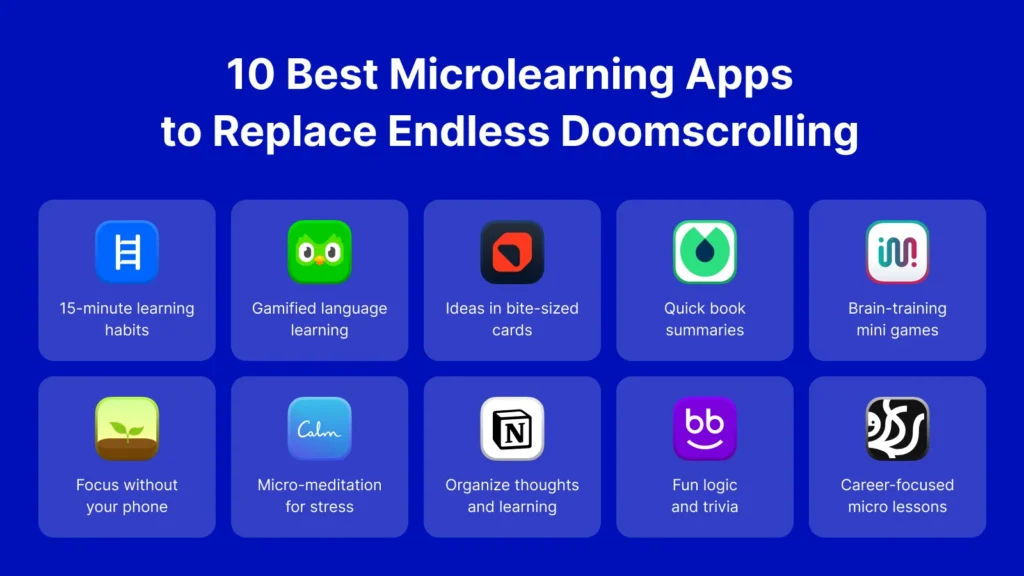
Download: Search “RepsForReels” on app stores. - Blinkist → Premium book-summary app rivaling Headway. Condenses nonfiction bestsellers into 15-minute reads or listens with highlights, audio, and offline access. Perfect for swapping TikTok/Instagram for quick intellectual wins.
Platforms: iOS and Android.
Pricing: Subscription with free trial.
Best for: Busy professionals craving knowledge without full books.
Download: blinkist.com - Duolingo → Gamified language learning that hooks like social media but builds skills. Streaks, daily goals, and fun lessons make it addictive in a positive way—many users report ditching reels for “just one more lesson.”
Platforms: iOS and Android.
Pricing: Free with ads; premium removes them.
Best for: Turning idle moments into skill-building.
Download: Widely available on app stores. - Elevate → Brain-training app for focus, memory, math, and reading skills. Daily games and challenges provide quick, rewarding sessions that feel productive instead of draining.
Platforms: iOS and Android.
Pricing: Free basics; subscription for full access.
Best for: Cognitive improvement over mindless consumption.
Download: App stores. - Vocabulary / Drops → Swipe-based word or language learning. Vocabulary delivers daily words with definitions and examples; Drops uses visual, game-like mini-lessons for new languages. Replace endless swipes with meaningful ones.
Platforms: iOS and Android.
Pricing: Free with in-app purchases.
Best for: Quick, educational dopamine hits. - Deepstash → Bite-sized idea cards from books, articles, and podcasts. Swipe through curated insights on productivity, psychology, and more—ideal for “scrolling” that’s actually enriching.
Platforms: iOS and Android.
Pricing: Free with premium upgrades.
Best for: Microlearning addicts. - The Brick → Physical digital boundary device. A small NFC-enabled square pairs with your phone; tap it to unlock blocked apps during focus times. Unlike software, it’s hard to bypass—place it out of reach or on your fridge for real friction.
Platforms: Companion app for iOS/Android.
Pricing: One-time hardware purchase.
Best for: People who override app blockers easily.
Learn more: getbrick.app - Minimalist Launchers (e.g., LessPhone, Dumb Phone, Minimalist Phone) → Transform your smartphone into a “dumb phone” by hiding icons, removing badges, and simplifying the home screen. Reduces temptation at the UI level.
Platforms: Android (stronger support); some iOS options.
Pricing: Free or low-cost.
Best for: Root-level distraction reduction. - Calm / Headspace → Leading mindfulness apps with guided meditations, sleep stories, and breathing exercises. Use them post-scroll to reset anxiety or as a replacement habit for calmer evenings.
Platforms: iOS and Android.
Pricing: Subscription models with free trials.
Best for: Managing the emotional fallout of doomscrolling. - Libby → Free library ebooks and audiobooks via your library card. Borrow bestsellers instantly—turn waiting moments into reading without spending money.
Platforms: iOS and Android.
Pricing: Free (library-supported).
Best for: Book lovers on a budget. - NYT Games / Wordle-style apps → Puzzle games like crosswords, Sudoku, or Connections provide satisfying, finite sessions without infinite feeds.
Platforms: iOS and Android.
Pricing: Free or subscription for full NYT access.
Pro Tip for Combining Tools: Start with a physical barrier like The Brick or grayscale mode + a blocker (Freedom or Opal), then fill freed time with replacers (Duolingo, Blinkist, or Elevate). Track weekly with built-in reports or apps like Habitica for gamified progress.
These products represent the 2026 landscape: from hardcore physical deterrents to joyful, growth-oriented alternatives. Many users in Karachi and globally report reclaiming 1–3 hours daily by mixing blockers with positive swaps.
Ready to experiment? Pick one new tool today and build momentum. For more on mobile tech shaping habits, visit wensite.